Skip to content
VV Ultimatum Tools decision crestVV UltimatumTools · Wiki · Guides
Charm Loadout Planner

VV Ultimatum Charm Loadout Planner for your current goal

The VV Ultimatum Charm Loadout Planner filters individual candidates, then compares combinations only after you enter a Notch limit, goals and checked Pair states.

Player-entered values only · unresolved states stay visible

Quick Mode · default

Choose the Charms you own from the community records.

Search all 67 community records by name or purpose. Selecting a Charm immediately reveals its effect, trigger and acquisition reference; the Advanced planner remains available only when you want to enter personal scores.

41 matching records · 1/12 selected

Single-Charm goal filter

0 of 1 selected Charm contain a recorded label or effect related to PVE.

This filters individual candidates. It does not recommend a two- or three-Charm combination. Unknown Notch costs and Pair interactions block that decision.

Factotum's Spirit

Community-reported

No direct PVE term match is retained.

  • Effect · Community-reportedEXP gain increases by 5%.
  • Effect · Community-reportedEXP UPs increase by 30%.

Notch cost: Unknown

Pair compatibility with another selected Charm: Unknown until checked in the current game.

Enter verified Notch and Pair checks in Advanced Mode
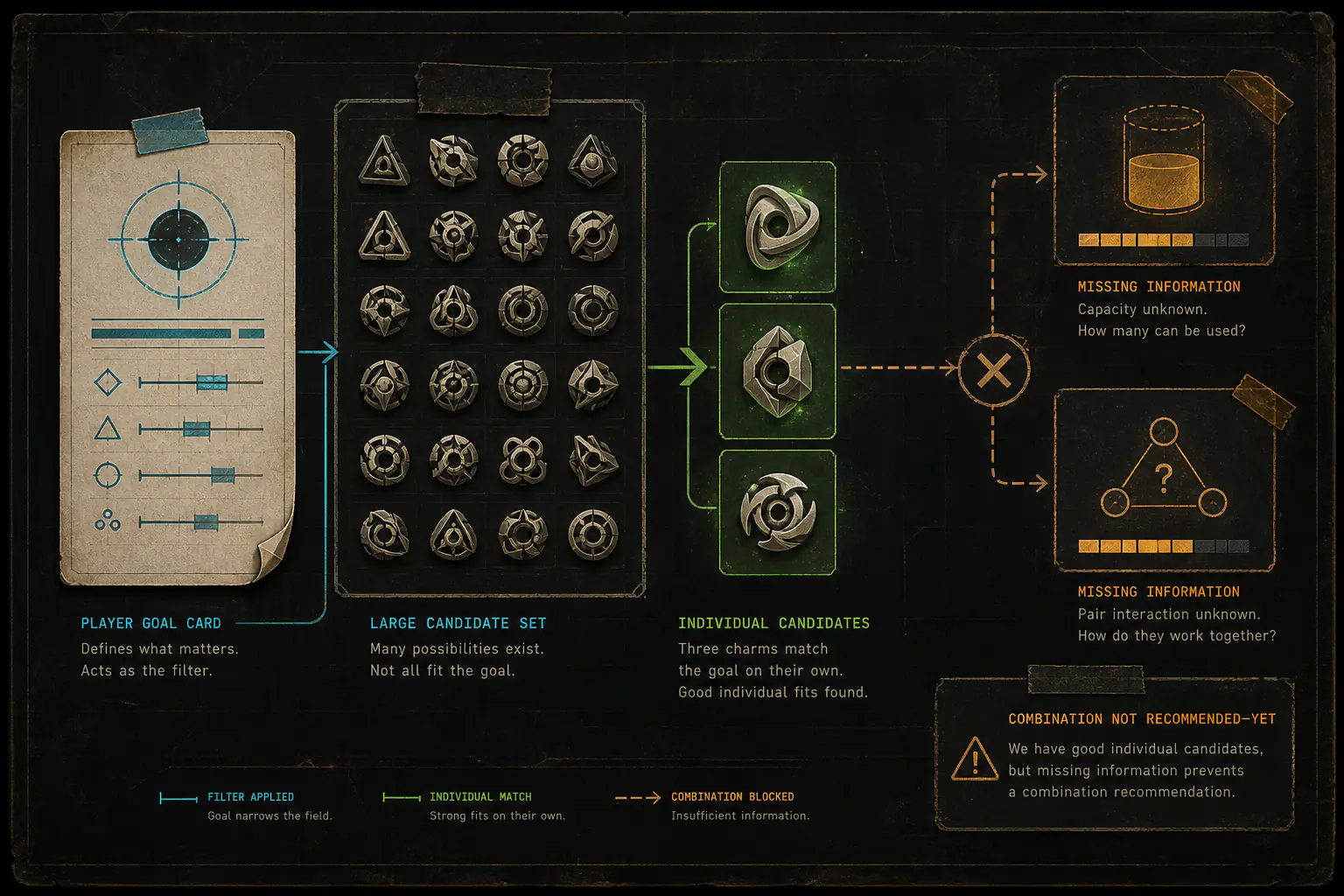
The cards above are the Quick result for individual candidates. Advanced Mode is optional and accepts your own six goal ratings when you want a formal trade-off comparison between confirmed combinations.

Advanced planner session

0 Charms

Ready rows

0

Unknown Pairs

0

Safe budget

3

01

Mode, budget and goals

Set the decision frame. Goal weights are your preferences, not gameplay measurements.

02

Owned Charms

Enter 1–12 distinct Charms from your current UI. No candidate list is loaded.

No Charms entered

Start with one Charm you own. Names, ratings and Pair states stay in this open page only.

03

Pair check

Missing knowledge stays Unknown. Unknown never becomes compatible by default.

0 total Pairs · 0 Unknown · open editor

No Pair rows match this filter.

What this comparison does not include

Switching tools in this tab ends this page's in-memory session. Nothing is carried across.

Charm goal filter narrowing a candidate set to individual matches while missing Notch capacity and Pair interaction block a combination recommendation
Quick Mode finds individual candidates. A combination stays blocked until Notch capacity and Pair interaction are known.

Use it in three steps

  1. 01

    Set mode and goals

    Choose the context and weight only the goals that matter to you.

  2. 02

    Enter owned Charms

    Copy names and Notches from your current UI, record when you checked them, select the modes you confirmed there, then add your own goal-fit and drawback-risk ratings.

  3. 03

    Check each Pair

    Mark what you personally confirmed; anything missing remains Unknown.

Use and steps

A visible path from input to trade-off.

  1. 01

    Set mode and goals

    Choose the context and weight only the goals that matter to you.

  2. 02

    Enter owned Charms

    Copy names and Notches from your current UI, record when you checked them, select the modes you confirmed there, then add your own goal-fit and drawback-risk ratings.

  3. 03

    Check each Pair

    Mark what you personally confirmed; anything missing remains Unknown.

  4. 04

    Inspect trade-offs

    Read separate Confirmed, Conditional and Rejected sections without a combined score.

Worked example

One known Pair, one unknown Pair.

Enter three owned Charms under a three-Notch budget. If one two-Charm Pair is confirmed compatible, another is confirmed conflict and a third is not checked, the results separate those outcomes instead of treating missing knowledge as compatibility.

Confirmed

Fresh inputs and every included Pair checked compatible

Conditional

Unknown Pair or a confirmation older than 30 days

Rejected

Budget, selected mode or confirmed Pair conflict failed

Method

Keep confirmed and uncertain choices separate

The planner checks every non-empty combination up to three slots. Confirmed and Conditional choices are compared separately. A choice is marked as a weaker fit only when another is at least as good on every active goal, risk and Notch cost, and better on at least one.

Limitations

No hidden gameplay layer

The planner does not load verified effects, health formulas, merge outcomes, clan exceptions, or an automatic tie-break. Player ratings are subjective inputs. A large result set is grouped by identical visible values and kept intact.

Evidence boundary

Why some Charm answers stay conditional

This planner keeps unverified Notch and Pair details out of its results. Confirm those details in your current game UI before treating a combination as ready.

Privacy

This page forgets the session.

Charm names, Notches, ratings, modes, dates, Pair states and results stay only on this open page. Clear Session or refresh removes them. Site-level measurement or advertising scripts may load under the site's consent settings, but these player inputs are never passed to them.

What is not collected

No player inputs sent to analytics or advertising

The planner does not send Charm inputs or results to a server or third party.

FAQ

Questions the comparator must answer honestly.

Why did a Pair become Conditional?

At least one included Pair is Unknown, or one of its UI confirmation dates is more than 30 days old.

Why is there no single winner?

Different goals, risk and Notch cost create real trade-offs. The planner keeps every still-competitive choice visible and does not invent a combined score.

What happens above 25 comparable choices?

The true count stays visible. Choices with identical values are grouped, every member remains inspectable, and the page asks you to narrow inventory or goals.

Can these entries become site data?

No. Your entries and calculated combinations never become site-provided Charm data.

Next step

Verify Conditional Pairs in your current game UI.

Then update the Pair state or observation date and compare again.

Return to inputs